How to add captions to a video on iPhone
Captions are the cheapest retention feature there is, and on a phone they take about a minute — if the app already knows what you said.
Updated
Adding captions is two problems wearing one name. The first is transcription: getting accurate words with accurate timings. The second is design: making them legible on a six-inch screen in daylight while somebody scrolls past at speed.
Most tools solve the first and hand you the second as a wall of sliders. The shortcut is to start from a transcript you have already corrected while editing, then spend your time on placement and contrast instead of on typing.
Step by step
- 01
Start from the transcript, not from scratch
Primecut has already transcribed the take in order to cut it, so the captions come from the same word-level timing. There is no separate 'generate subtitles' step to pay for or wait on.
- 02
Turn captions on
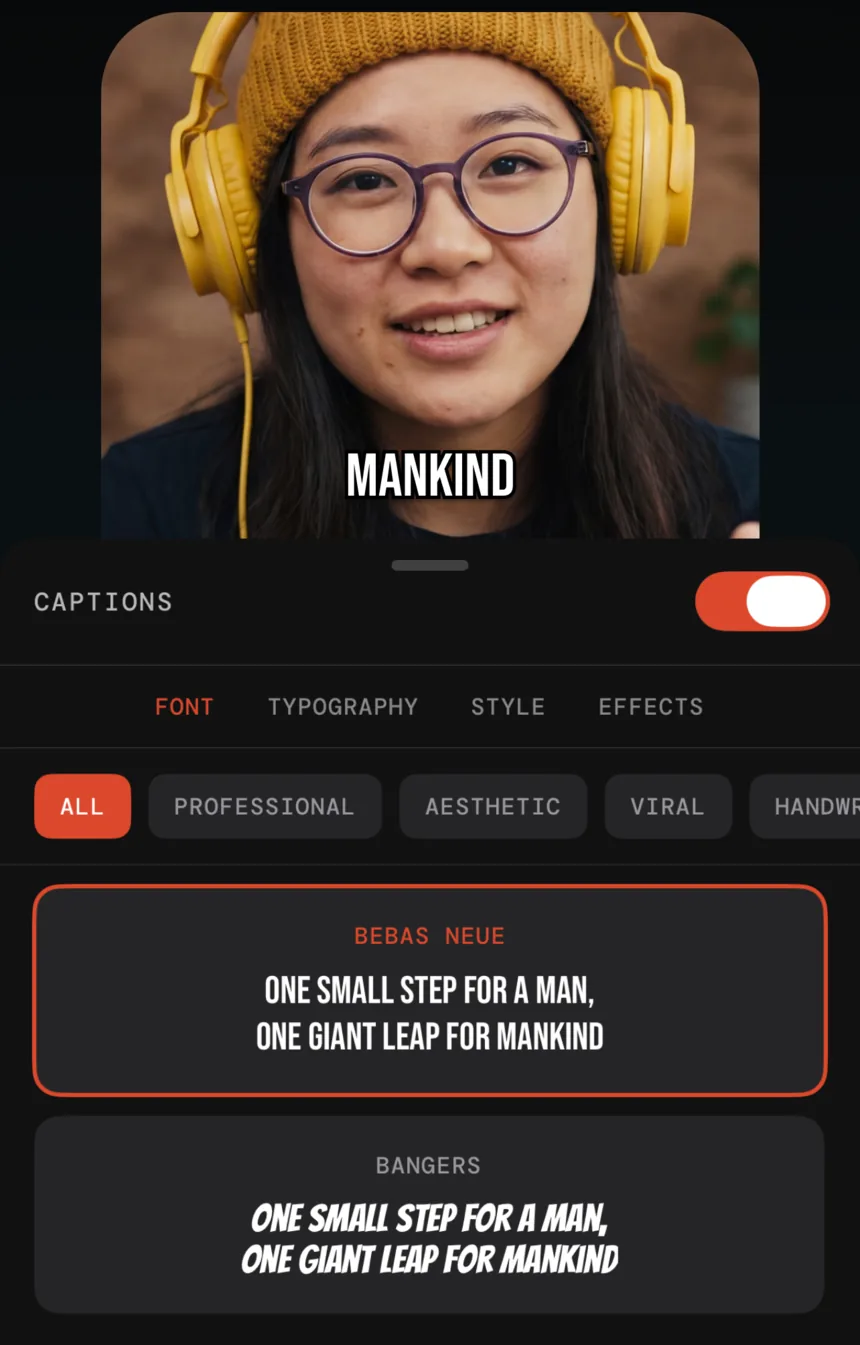
Flip the captions switch in the styling panel. Words appear over the video in sync with the audio, on whichever segments survived your edit.
- 03
Pick a preset
Presets are grouped by intent — professional, aesthetic, viral, handwritten. Bold condensed faces like Bebas Neue read best on a phone screen at arm's length; script faces look good and get skipped.
- 04
Adjust font, colour, effects and position
Keep captions inside the middle third vertically: too high and the platform's own UI covers them, too low and the caption bar does. High contrast beats brand colour if you have to choose.
- 05
Fix any word the model misheard
Edit the word in the transcript and the caption updates with it, because they are the same data. Proper nouns and product names are worth a skim before export.
- 06
Export for the platform
9:16 for Reels, TikTok and Shorts; 1:1 for feed posts; 16:9 for YouTube. Pro exports up to 4K with no watermark.
Caption styling that survives a phone screen
- Contrast over colour. White or near-white type with a subtle shadow or stroke beats a brand-coloured caption on almost every background.
- Two or three words at a time. Long lines force reading instead of glancing, and glancing is all you get.
- Stay out of the platform's furniture. The bottom fifth of a vertical video is occupied by captions, handles and buttons on every platform.
- Pick one look and keep it. Caption style is a small but real part of how people recognise your videos in a feed.
Questions
Are burned-in captions better than the platform's auto-captions?
For short-form video, usually yes. Platform captions are often off by default, they render in a style you do not control, and they disappear in reposts and downloads. Burned-in captions are part of the frame — which is also the argument against them: they cannot be turned off, so styling and accuracy matter more.
Can I upload an SRT instead?
Primecut generates captions from its own transcript rather than importing a subtitle file. If you already have a corrected script, fixing the handful of words the model got wrong in the transcript is generally faster than reconciling an SRT to the cut.
Do captions actually improve retention?
Most short-form video is watched muted at least at first, so captions are the difference between a scroller reading your hook and not. Treat the first line as a headline: if it does not say something in three words, the caption is doing decoration rather than work.