A Detail app alternative for cutting talking-head video
Detail is the most complete video studio on the iPhone. That is the case for it, and also the reason someone would want something narrower.
Updated
Let us start where most comparison pages will not. Detail is a bigger app than Primecut by every measure that is public: 3,521 App Store ratings against our 12, a longer history, and a feature list that covers multicam recording, livestreaming, green screen, reaction layouts, remote guests and a video podcast studio. Its free tier gives you unlimited recording and editing and asks only that you accept a watermark.
So the useful question is not which app is better. It is whether you want a studio or a cutter — and, more precisely, what you want the AI to hand back to you.
| Primecut | Detail | |
|---|---|---|
| What it is | A focused cutter for talking-head video. | An all-in-one mobile studio: record, multicam, livestream, edit, publish. |
| What the AI hands you | Your whole take, tightened — silences, fillers and repeated lines removed. | Highlight clips: it finds the best moments and cuts shorts and reels from them. |
| Repeated takes | A dedicated pass. Say a line three times and the last one survives. | Silence removal is built in; picking between repeated deliveries is not a separate pass. |
| Recording | Single camera with a scroll-speed teleprompter. | Multicam across iPhone and iPad, livestreaming to RTMP, green screen, split-screen reactions, remote guests. |
| Teleprompter | Scroll speed and text size, positioned high in frame for eyeline. | AI Director listens as you speak and follows your place in the script. |
| Captions | Word-level with styling presets. Tuned for English, no subtitle-file export. | 50+ languages, fully editable, exportable as a separate subtitle file. |
| Free tier | 30 minutes of AI processing once; all editing features; watermarked exports. | Unlimited recording and editing; watermarked exports. |
| Price | $59.99 per year, or $9.99 per month. | Pro at €5.83 per month, or €70 billed annually. |
| Track record | 4.5★ from 12 ratings. Small and new. | 4.6★ from 3,521 ratings. Established. |
The real difference: highlights versus a tightened take
Detail’s AI Auto-Edit is curatorial. It listens to your footage, decides which moments are the good ones, and assembles shorts and reels out of them. Point it at a 30-minute interview and it will find you something postable, which is genuinely useful and hard to do well.
Primecut’s pass is janitorial. It assumes everything you said was on purpose, and removes only what nobody meant to keep: dead air, filler words, and the sentences you started over. Point it at a 90-second explainer and you get the same explainer at 70 seconds, in your order, with your ending.
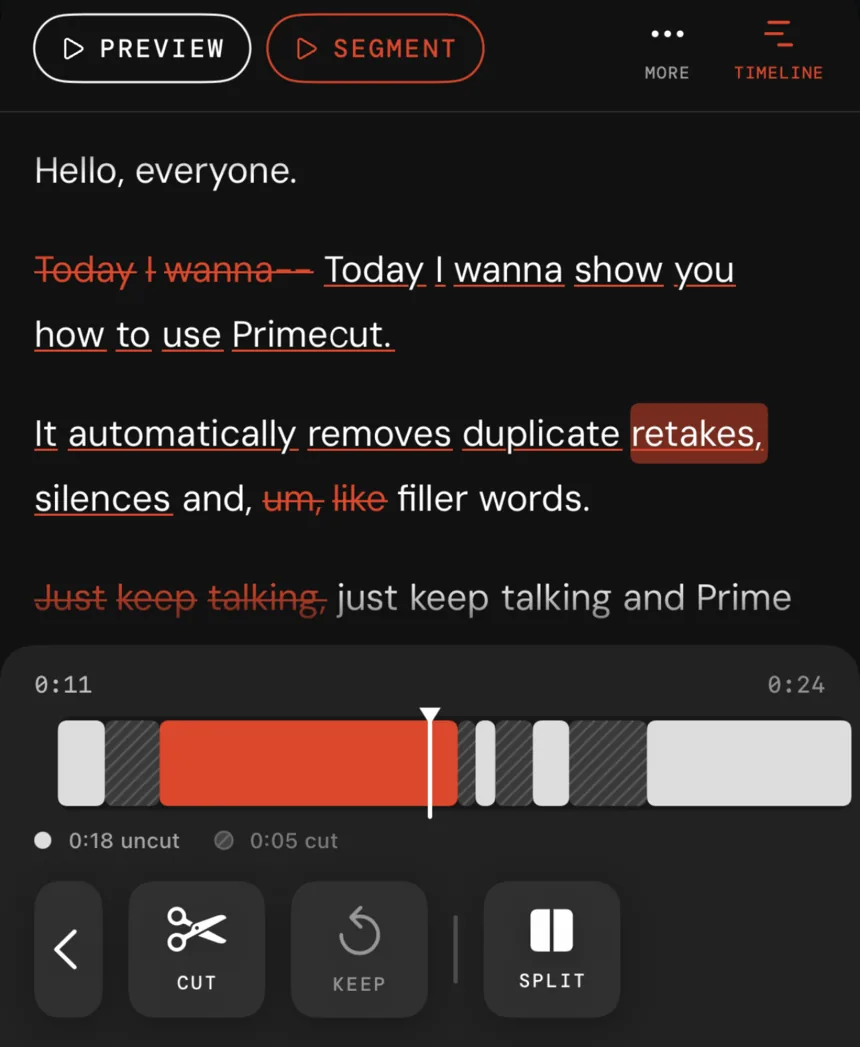
Neither is the correct behaviour in general. They are answers to different questions, and the question you have depends on whether you recorded raw material or a finished piece with mistakes in it.
Where Detail is clearly the better buy
- You need more than one camera. Multicam across iPhone and iPad, with live switching, has no Primecut equivalent.
- You publish in more than one language. Captions in 50+ languages, editable and exportable as a subtitle file, against our English-tuned captions with no subtitle export.
- You go live, record guests, or make reaction content. Livestreaming, remote guests, split-screen reactions and green screen are all things Primecut simply does not do.
- You want to pay nothing. Detail’s free tier is more generous than ours: unlimited recording and editing, with the watermark as the only real constraint.
Where Primecut is
- You fluff lines and say them again. The retake pass is the one thing here that has no direct counterpart, and on a messy one-take recording it is the largest single time saving available.
- You want the whole take, not a highlight of it.
- You would rather not learn a studio. Fewer features is the product, not a roadmap gap.
- $59.99 a year suits you better than €70.
Questions
Is Detail better than Primecut?
For most definitions of 'better', yes — Detail is a bigger, more established, far broader app, and its free tier is more generous. It wins on captions, on recording features and on maturity. Primecut is worth choosing for one specific reason: it removes repeated takes as a first-class pass, and its output is your whole take tightened rather than a highlight clip cut from it.
What is the actual difference between the two AI passes?
Detail's AI Auto-Edit is subtractive in a curatorial sense: it looks for the best moments and builds a short from them. Primecut's pass is subtractive in a janitorial sense: it assumes you want everything you said, minus the dead air, the filler words and the sentences you started over. If you recorded a 90-second explainer and want a 70-second version of that explainer, that difference matters. If you recorded 30 minutes and want a 60-second clip out of it, Detail's model fits better.
Does Primecut do multicam or livestreaming?
No. There is no multicam, no livestreaming, no green screen, no reaction layout and no remote-guest recording. If any of those are on your list, Detail covers them and Primecut does not.
Which is cheaper?
Primecut, at $59.99 a year against €70 a year for Detail Pro — but Detail's free tier gives you unlimited recording and editing with only a watermark, so if watermarked exports are acceptable, Detail free may cost you nothing at all.